
A money diary for iPhone
Log it in a tap. Mochi keeps count.
BunnyBank learns where, when and what you usually spend, so most expenses take one tap. Scan a receipt or just say what you spent, then see what's left for the month.

Available nowFree to download · no subscription
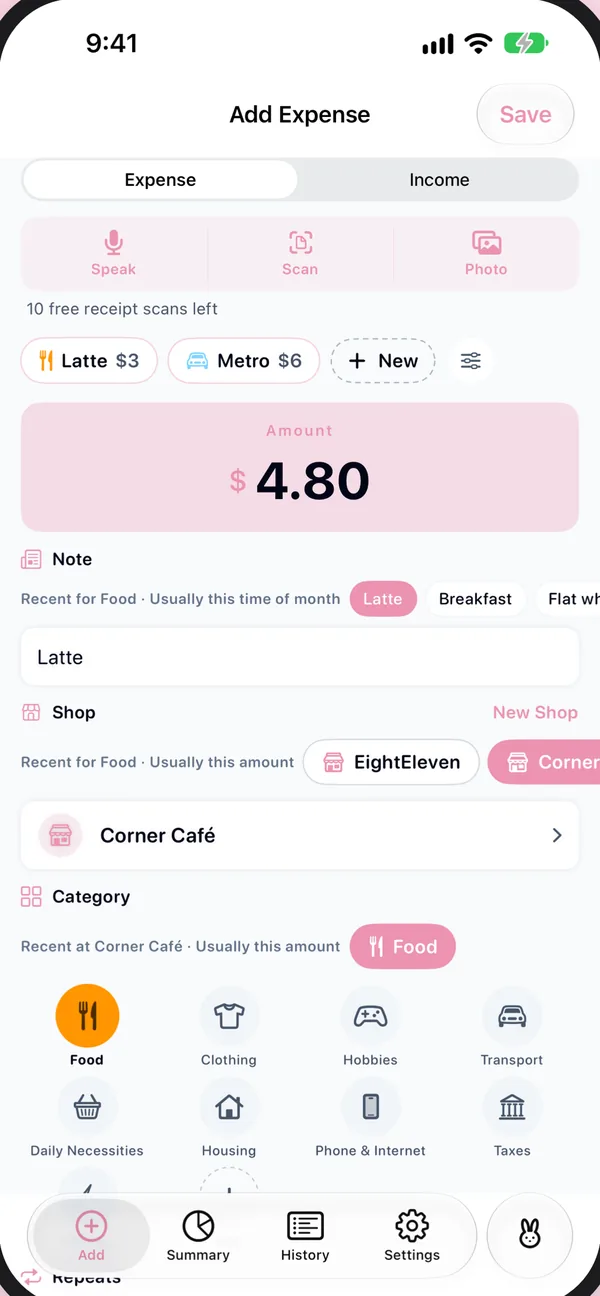


Smart suggestions
It learns your day, so you barely type.
BunnyBank notices where you are, what time it is, what's on today's calendar and what you usually spend. Next time, the right shop, category and note are already waiting.
At 8:05 by the station, the café you always use comes first. At lunch, the restaurant on today's calendar does. On the way home, a shop you've never saved shows up because it's nearby. On the 25th, rent is waiting.
-
Where you are
The shops you use near here come first. Places around you show up even before you've saved them, and each shop learns where it is from where you log it.
-
When it is
Morning coffee, Friday drinks, rent on the 25th. The time of day, the day of the week and the day of the month all count.
-
Today's plans
If your calendar says "Dinner with Aya", a meal comes first. If it names a shop, that shop does. Only today's events are read.
-
Your habits
$4.80 is usually the coffee, and what you log after the train is usually next. Habits fade, too: one from three weeks ago counts half as much as today's.
All of it is worked out on your iPhone. Places are kept with your expenses, on your iPhone and in your own iCloud. Calendar events are never saved or sent. Location and calendar are both optional, and you can erase what it learned in Settings.
Less bookkeeping, more knowing.
No spreadsheets and no guilt. Just a clear picture of your month, in a little diary that fills itself in.
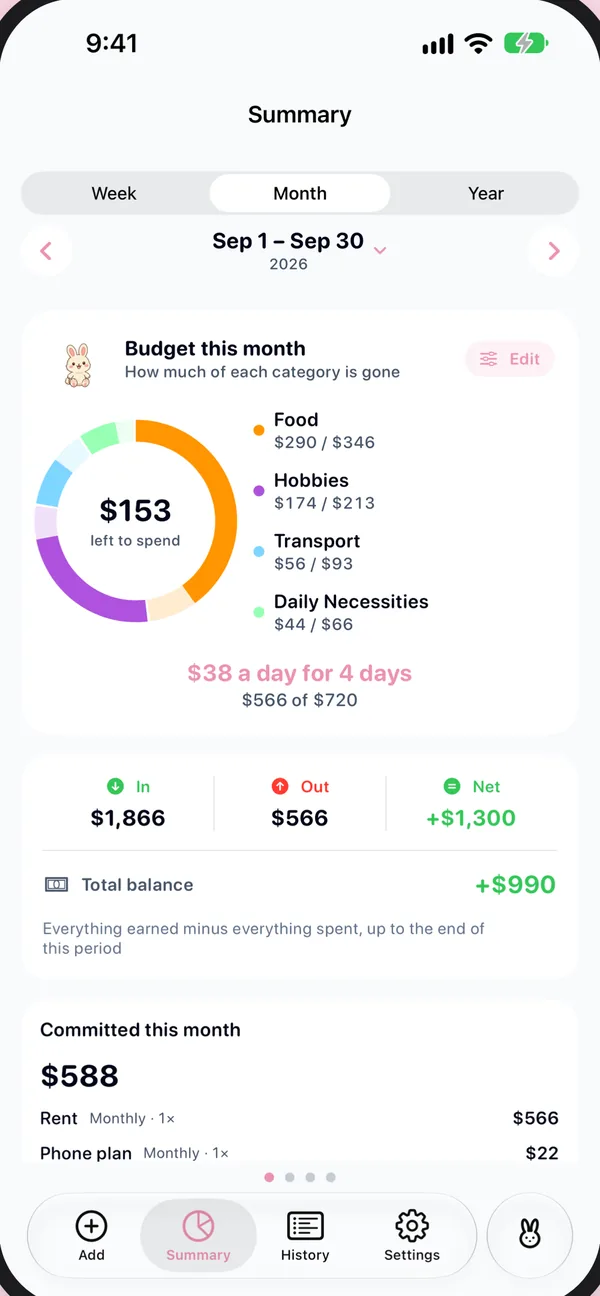
Know what's left, down to today.
Give each category a budget and BunnyBank turns what's left into a daily allowance: how much you can spend today and still end the month on track.
- Income, spending and savings for the week, month or year
- Charts by category, by shop and by day
- Gentle weekly and monthly recaps, and reminders for bills that repeat
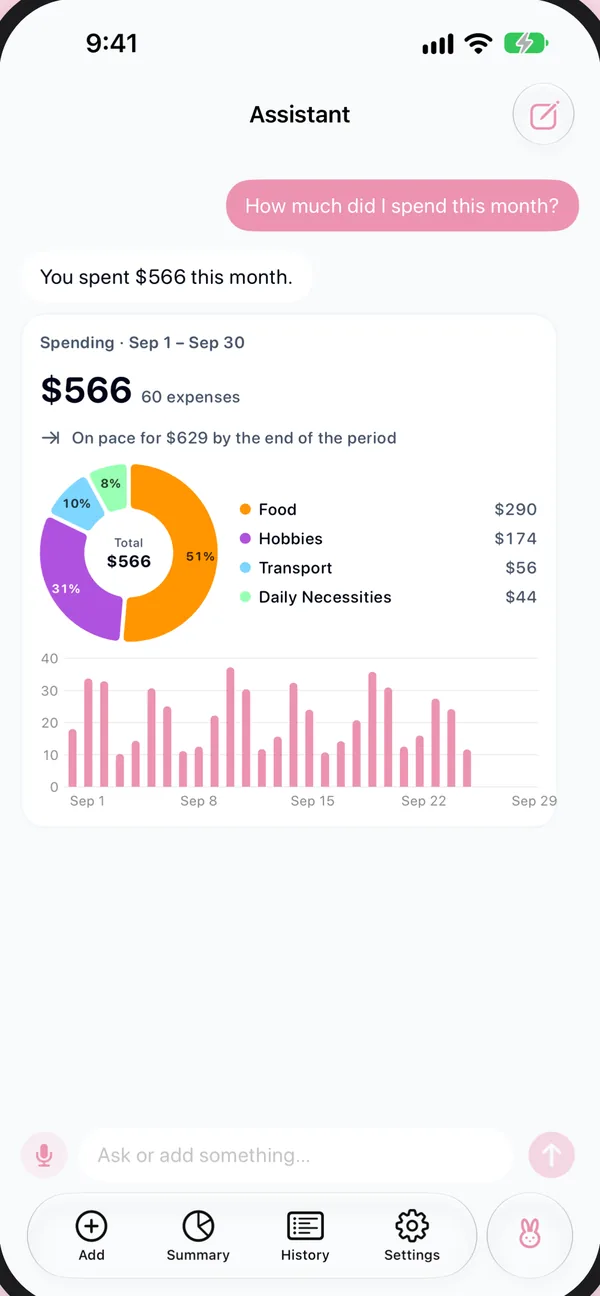
Ask about your money, get a chart back.
"Where do I spend the most?" "How much went on food this week?" The Assistant answers with the numbers and a chart, and you can add an expense the same way.
- Runs on your iPhone with Apple Intelligence
- Nothing you ask is sent to me or to anyone else
Also tucked inside
- Scan a receipt
- Point the camera at a receipt, or share a screenshot of an online order, and the form fills itself in.
- Just say it
- "Lunch at Lawson, 850 yen." You check it, then save.
- Templates
- Your daily coffee or commute in one tap.
- Widgets & Siri
- Home and Lock Screen widgets, Control Center, and "Coffee in BunnyBank".
- Many currencies
- Log travel spending in the local currency, or move your home currency with you.
- Trips remembered
- Back in a city you've visited? What you used there last time comes first.

Your diary stays with you.
No account to make and no servers of mine. What you write down lives on your iPhone and in your own iCloud, and I can't see any of it.
- No account
- No ads
- No tracking
Free, with no subscription.
Everything you need to track your spending is free. If you want more, pay once for the part you'll use and keep it on every iPhone signed in to your Apple Account.
Receipt reading, speaking an expense and the Assistant need an iPhone with Apple Intelligence.
BUNNYBANK
optional upgrades · pay once
thank you! ♡ come again